Gender and Diversity on UnivIS: the Gender Checkmark
??????Events related to the topics of gender and diversity can now be easily found using a filtered search function on UnivIS.
?????Here is how staff can label events:
In the section “Create/Edit Course” → “Topics and Interests”, you can simply check the box “Gender and Diversity” to mark your course.
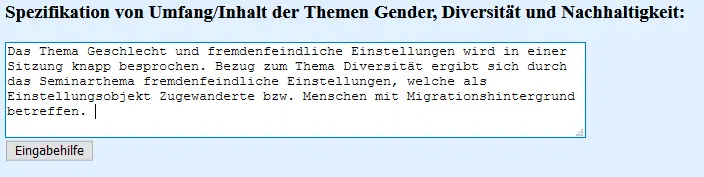
Additionally, under “Additional Information” → “Change Additional Information” in UnivIS, you can provide more details on how extensively your course addresses gender and diversity topics.
Even if these topics are only covered to a small extent, for example in a single seminar session, it is still useful to both check the box and provide a brief description in the additional information section. This way, you help make gender and diversity topics more visible in teaching!

Students can find these courses as follows:
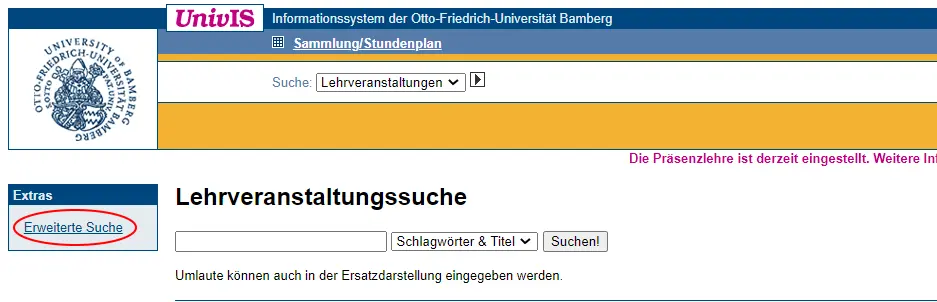
Click the arrow next to “Search: Course”. This will display the “Advanced Search” tab in the left column of UnivIS.
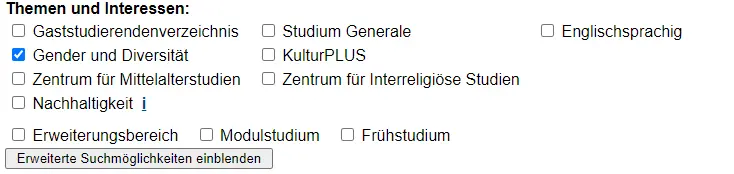
Select “Advanced Search”, and a form will open. Under “Topics and Interests”, you can check the box for “Gender and Diversity”. UnivIS will then show a list of all courses at the University of Bamberg that instructors have marked with the Gender and Diversity tag.
Gender & Diversity Course Catalogue
??????The Representatives for Equal Opportunities and the Vice President for Diversity and International Affairs at the University of Bamberg have created a catalog of courses on gender and diversity in which they have compiled all courses that have been labeled as relating to the topics of gender and diversity.
You can find the course catalog and other information on the topic of gender and diversity in teaching on the Vice President’s website.